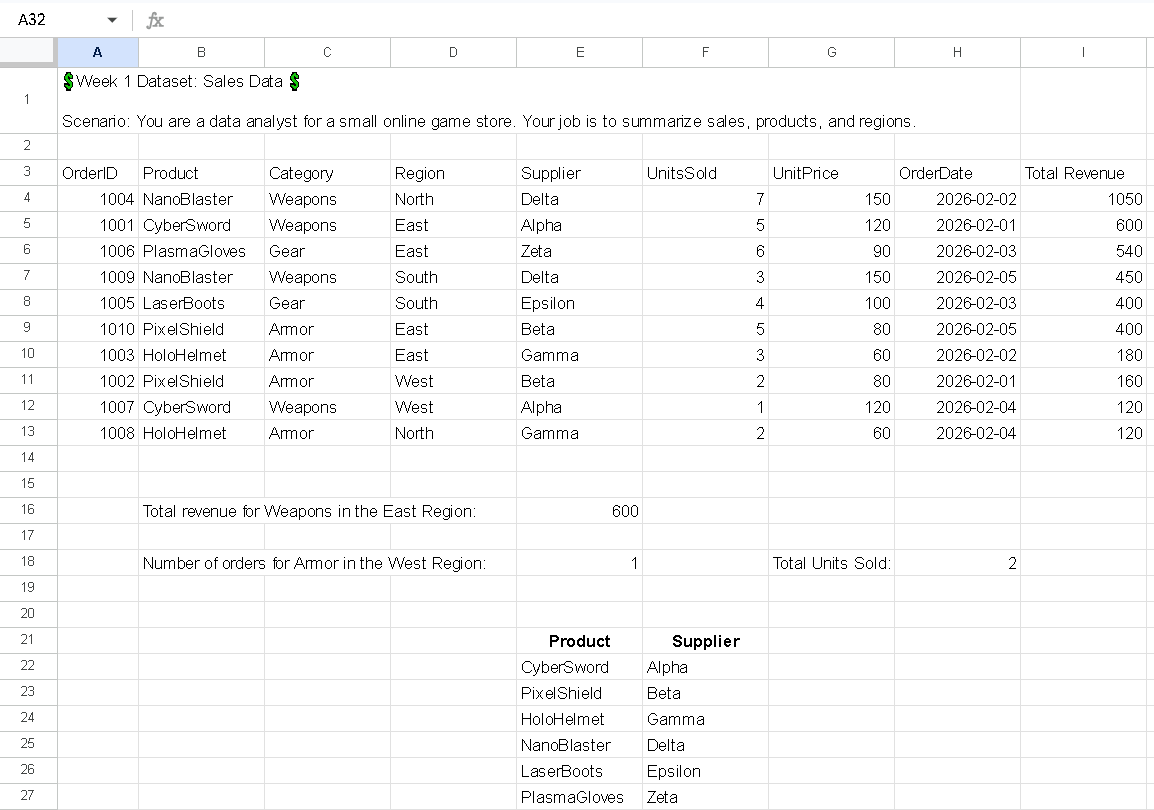
| Excel Project 1 |
| What did I learn from this Excel Project: |
|
Purpose: Adds (sums) the values in a range that meet multiple criteria. Example: To sum sales in column B where the region in column A is "North" and the sales in column C are greater than 100: =SUMIFS(B2:B100, A2:A100, "North", C2:C100, ">100") COUNTIFS: Purpose: Counts the number of cells that meet multiple criteria. Example: To count how many orders in column A are from "North" and have a status of "Completed" in column B: =COUNTIFS(A2:A100, "North", B2:B100, "Completed") XLOOKUP: Is a function in Microsoft Excel that allows you to search for a specific value in a range or array and return a corresponding value from another range or array. Example: Suppose you have a list of employee IDs in A2:A10 and their names in B2:B10. To find the name of employee with ID 123, you could use: =XLOOKUP(123, A2:A10, B2:B10, "Not Found") How to Use Relative vs Absolute References You need to lock the lookup table ranges so they don’t move. Add dollar signs $ like this: =XLOOKUP(B2, $K$2:$K$7, $L$2:$L$7, "Not Found") Now when you drag it down: B2 will change to B3, B4, B5 $K$2:$K$7 will NOT change B2  relative (moves when dragged) relative (moves when dragged) $B$2 absolute (locked completely) $B2 locks column only B$2 locks row only |